Silverlight
01.SilverLight3 - Hello World [ 시작 ]
Godffs
2009. 11. 23. 17:33
반응형
SilverLight3 시작~!
[그림1-3]에서 디자인 코드 부분에서 작업합니다.
Hello World 단어를 출력하는 간단한 예제입니다.
입력 후 F5 키를 눌러 프로젝트를 실행합니다.
| 프로젝트 추가 |
| 새 프로젝트 추가 - Silverlight Application 선택, 이름 지정 -> "Helloworld" 다음 기본값으로 놓고 OK 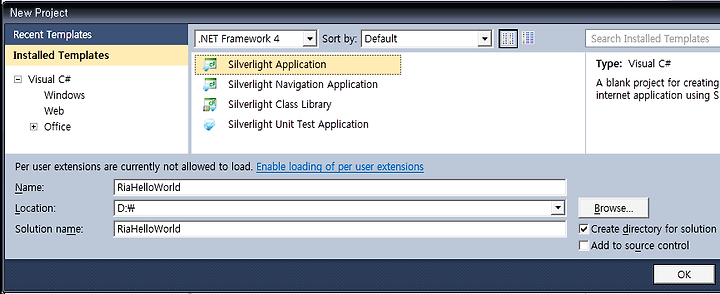
[그림1-1] 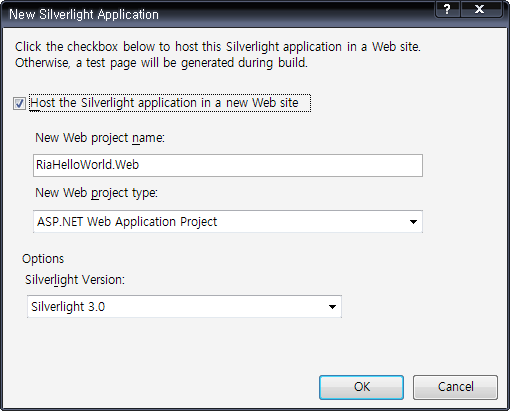
[그림1-2]
Visual Studio 2010에서 Silverlight3.0을 실행한 기본 화면 입니다.
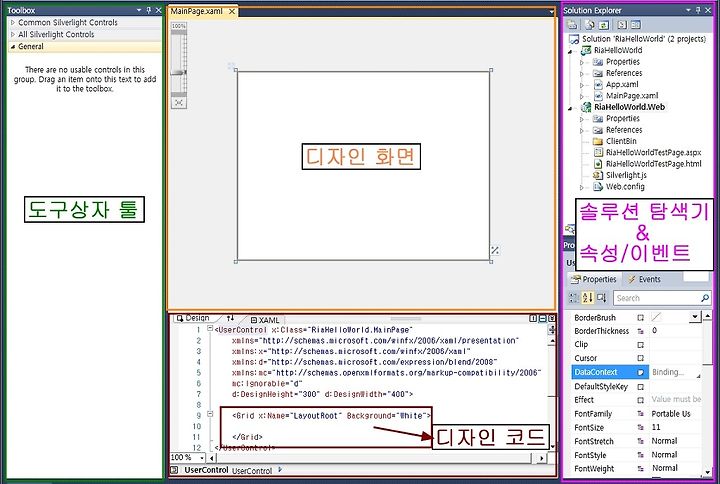
[그림1-3] 솔루션 탐색기 - App.xaml은 처음 출력되는 페이지로 전체 프로젝트과 에러처리를 담당 - MainPage.xaml은 디자인 파일 - MainPage.xaml.cs는 코드비하인드 페이지로 프로그래밍 코드 작업 페이지 |
Hello World 단어를 출력하는 간단한 예제입니다.
| HellowWorld.xaml |
|
<Grid x:Name="LayoutRoot" Background="White"> <TextBlock x:Name="lblDisplay" Text="Hello
Word" FontSize="20" Width="120" Height="27" TextAlignment="Center"></TextBlock> </Grid> |
입력 후 F5 키를 눌러 프로젝트를 실행합니다.
| 결과확인 |
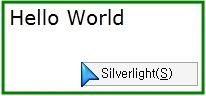
[그림1-4] |
 RiaHelloWorld.zip
반응형